v1.14
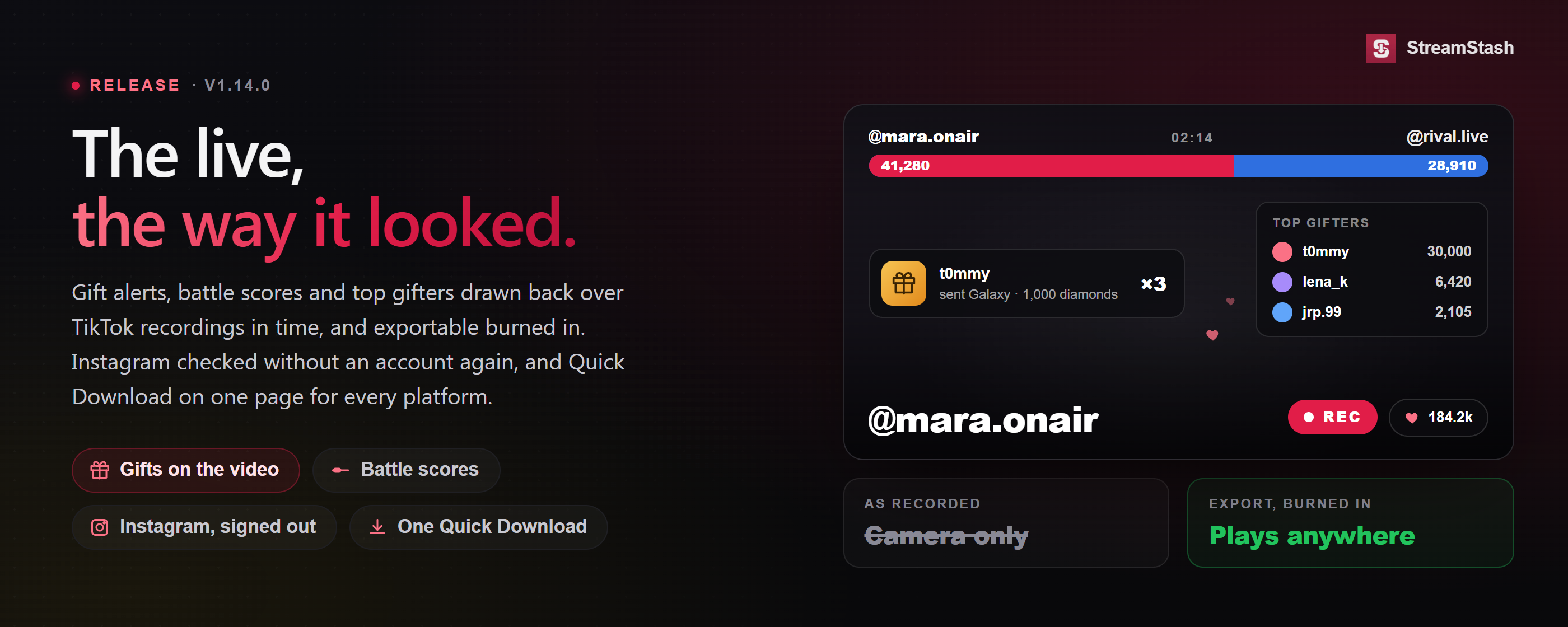
17 September 2026 v1.14.0TikTok recordings now play the way the live looked: gift alerts, full-screen animations, hearts, battle scores and top gifters, drawn back over the video in time and exportable burned in. Alongside that: Instagram checked without an account again, one Quick Download page for every platform, and fixes for uncompressed recordings, slow startup and full drives.
New
- New Gift alerts play over the recording (Power) TikTok draws gift animations on your screen as you watch, but they were never part of the video, so a recording kept the camera and lost every one. StreamStash now draws them back on, in time, with the gift's own artwork, who sent it and what it was worth. The switch is in the live chat panel, off until you turn it on.
- The big ones play in full. The Lion, the Universe, Zeus and the rest take over the screen the way they did live, then get out of the way. A size setting under TikTok chat keeps more of the creator visible if you prefer.
- Hearts, the way TikTok shows them. Taps float up from the corner with a running like counter at the top. Earlier recordings did not save that count, so on those it counts from the start of the recording and says so.
- Artwork kept locally. Each gift's picture is fetched once and reused; new gifts TikTok adds are picked up on their own.
- New Battle scores on the recording (Power) The score bar TikTok shows during a battle was drawn on your screen, never recorded, so a saved battle had two creators competing with no way to tell who was ahead. It is now drawn back on: both creators named, running scores, the split between them, and the win, lose or draw animation when it closes.
- Two creators, three or four. Head to head is one bar split two ways; a free-for-all or a team match is a stacked list, the way TikTok shows it. Link-ups with no contest are left alone.
- The victory lap. A winner chip with the countdown stays where the score bar sat until the lap ends or the next match starts.
- From here on. Battles already in your library are still found by looking at the picture; scores are new information captured live, so they appear on battles recorded from now.
- New Top gifters (Power) Under a TikTok recording's stats there is now a ranked list of who spent the most, with what they gave and how many gifts it took; it adds up to the diamond total above it. The same ranking can be drawn over the video as it stood at that moment: off, during battles only, or always. Works on recordings you already have, showing the amounts; the names only appear on recordings made from this version on, for the reason under Fixes.
- New Export the video with it all burned in (Power) Everything the overlay draws, alerts, score bar, big animations, the result and the top-gifter block, can be written into a copy of the recording so it plays that way anywhere: on your phone, in an editor, or shared. It is an option in Edit & export beside Battle focus, works with a trim, runs in the background with progress, and can be cancelled and resumed. Allow roughly twenty minutes per hour of video.
- New Quick Download is one page for every platform Paste a TikTok, YouTube, Twitch, Kick, X or Instagram link into one box and the right download starts; a link already says where it came from. Filter pills narrow it to one platform and it remembers the one you use most. The old per-platform addresses still land on the same page, so bookmarks and the Add from Browser bookmarklet carry on.
- Mixed batches. A pasted list shows one row of options per platform it contains and applies each link's own. Twitch and Kick links in a batch download now; previously every one failed.
- Creator cards. Downloads are shown as a card per creator, so the page keeps its shape whether you have one creator or thirty.
- Profile links. Paste a whole channel or profile and it offers to take you to that platform's Feeds page with the name filled in, instead of dead-ending.
- New Quick Download for X Paste a tweet link, x.com or twitter.com or a mirror, and its photos and video are saved under that account with a link back on every card. Public tweets need no login, so a one-off costs your X account nothing; protected and age-restricted tweets still need you signed in, and the card says so. It stays a one-off: the account is hidden from Feeds and never checked until you choose Convert to Feed.
- New Quick Download for Instagram Paste a post, reel or IGTV link and it is saved under that account, a carousel as one card per slide. A public post is fetched without any Instagram login, so a one-off never touches your accounts; only a post from a private account you follow uses your main one, and only for that post. Convert to Feed asks how often to check, whether to collect stories, and which group.
- New Quick Download tells you when you already have something Paste a link you have already downloaded, short or full, and it says so and links to your copy without fetching anything, on every plan. With deduplication on (Power), a paste whose content you already have under a different post, a repost, a re-upload or the same clip on another platform in a group, is recognised by its content and points you at the existing copy. This used to be reported three different wrong ways, including a TikTok photo post claiming a download that never happened and leaving a blank card behind.
- New Discord channels sit under their server Archive two or more channels from one server and they nest under the first on the Discord page, the way grouped accounts do elsewhere: a chevron folds the others away, a count shows how many, and each channel keeps its own row and settings. Putting a channel in a group with a creator's other accounts still nests it there instead.
- New A history of what happened to each Instagram account When a second account kept being signed out there was nothing to look back at. The Instagram Accounts page now keeps a short history per account, signed out, checkpoint, brief block, lookups limited, and each recovery, with how busy the account had been in the hour before. Nothing is stored about which creators were involved.
Improvements
- Improved Public Instagram creators are checked without an account again Checking public creators for new posts no longer uses an Instagram account. 1.13 had moved it onto one because Instagram had stopped answering signed-out requests; that turned out to be narrower than it looked. Quietly checking ninety creators a day while signed in is what gets an account asked to prove it is a person, so this takes the largest job off your accounts.
- The heavy work too. Adding a creator and catching up on their older posts no longer runs on an account either.
- Add while signed out. A public creator can be added again with no account signed in at all.
- Quiet Hours are optional for them. A switch under Instagram in Settings lets public creators sync straight through rest windows; stories, reels and private creators stay rested.
- A warning when nothing is being found. Checks that complete but come back empty for several creators in a row are called out on the Instagram page.
- Notices that say what is happening. Messages separate what is waiting on an account from what is still running, and the page says when a signed-out second account has cut story coverage.
- Improved Creators Instagram hides from signed-out visitors A few creators are not shown to anyone who is not signed in, often an adult or sensitive-content setting. Looking one up said "Instagram blocked this lookup" when nothing was blocked, and once added their posts were quietly never collected. They now look up normally and are collected through an account, the way stories are; the row and the add screen say so. A handle that genuinely does not exist now says "couldn't find" instead of blaming a rate limit.
- Improved Looking up a creator when Instagram is being difficult Instagram limits looking a profile up by name far more tightly than anything else, so a healthy account could be refused after a handful and the lookup would report the creator as renamed, removed or deactivated when they were nothing of the sort. Lookups, adding a creator and the highlights picker now take a different route that Instagram does not limit that way. The "rate limited" notice says exactly what is limited; stories, highlights and reels were never affected and it no longer claims they were.
- Improved Keep finding posts when Instagram walls off signed-out checks Now and then Instagram sends every signed-out visitor to its login page for a while, and public creators' new posts wait it out. A new switch under Instagram in Settings lets a creator whose check hits the wall be looked at with an account instead, your second account where you have one. Off unless you turn it on, because it costs a few account requests per creator while the wall is up.
- Improved TikTok chat capture says when its daily allowance is reached, and lets you raise it Saving TikTok chat depends on a service with a daily allowance, which was recently cut sharply. Once reached, every recording for the rest of the day saved video and viewer counts but no chat or gifts, with nothing to say why.
- Raise it for free. Settings, under Capture Live Chat & Gifts, takes a key from a free account that raises the allowance twenty-five fold, with a short guide and a readout of what is left today.
- Running out no longer makes it worse. Instead of retrying into an empty allowance and giving up, it waits for the refresh, so a long stream picks chat back up on its own.
- Chat already saved is never lost. It is written as it arrives, not held to the end, and the player says whether the allowance ran out and where to go about it.
- Improved Rebuilding after a crash is far quicker Piecing a crashed recording back together used to re-encode it and then compress it again afterwards, the same footage twice. The pieces are now joined as they are, around nine times faster, and one large recording no longer holds up every rebuild behind it.
- Improved The recording card says what is actually happening A recording saved without compression said "Compressing", which was never true; it now says Saving. Where the outcome differs from your setting the card explains why: a stream that changed size part-way needs one pass to play correctly, and a very long Twitch or Kick recording is saved as captured rather than occupying the queue for hours. Waiting its turn is now separate from being held by Quiet Mode.
- Improved Faster startup on large libraries A check for files left empty by an interrupted download ran over every item in the library before the app would open. It now runs on the daily background pass, just as thoroughly. On a library of around half a million items, startup went from over six minutes to about a minute and a half.
- Improved Big drives keep more in reserve With more than one library drive, new downloads move to the next drive once the current one is nearly full. That line sat 2 GB from the end whatever the drive's size, but a live recording is placed once and can write far more than that, so an 8 TB drive could be run to zero. The reserve now scales with the drive: half a percent, at least 2 GB and at most 50 GB. Single-drive installs are unchanged, and the Storage page uses the same number.
- Improved The compare slider says which way is which The Kept and Dropped labels sat in the corners, so it was not obvious which copy you were revealing. They now ride on the divider itself, one either side with an arrow.
Fixes and polish
- Fixed Compression off now means compression off A recording rebuilt after a crash or a forced shutdown was compressed anyway, at the slowest quality setting, which on a long capture ran for hours before replacing the original. Rebuilds now follow the setting like everything else.
- Fixed Recordings keep the shape they were filmed in Rebuilding assumed every recording was a tall phone-shaped video, so a widescreen Twitch or Kick capture was squeezed into a tall frame, and a TikTok stream that switched between its two portrait shapes mid-broadcast lost about a tenth of its width for good. Recordings now keep their own shape and settle on the taller one where it changes; the other stretches get black bars, which can be trimmed later. Lost detail cannot be recovered.
- Fixed Recordings waiting to be rebuilt were passed over If a creator went live again before an interrupted recording of theirs had been rebuilt, the older one was skipped, and skipped again on every restart, while its video sat untouched. Waiting recordings are now matched to themselves rather than to the creator.
- Fixed Quit could leave a popup that ignored you Choosing Quit while recordings or downloads were running asks whether to close anyway. On some Windows 11 machines that question appeared and then ignored every click, the tray icon stopped responding, and the only way out was Task Manager, which skips the safe shutdown and lost the recording being written. Quit now answers immediately, the tray stays usable, and the app says what it is finishing.
- Fixed A library drive could fill to zero An Instagram carousel that lost some of its pictures to a full drive was marked as saved and the rest never fetched; it is now left for the next scan, which fetches only what is missing. Database backups could be parked on a drive placement already considered full; they now need the same headroom as everything else.
- Fixed A drive that stops answering no longer freezes the app A library drive taken offline and back without a restart, or an external enclosure hiccupping, could leave the app waiting forever for that drive's free space, and because nearly every page asks for it, the whole app appeared frozen while recordings carried on underneath. That question now gets five seconds; a drive that does not answer is treated as unavailable for half a minute and the app stays usable.
- Fixed Replaced Copies showed the wrong picture When a replaced copy came from a carousel, the row showed the post's first picture as the kept side, with that picture's size, so it looked like two different photos and the "better by" figure was measured against the wrong file. The row now shows and measures the same picture Compare does.
- Fixed A false alarm about Instagram posts disappearing A creator with no grid posts but stories or highlights saved was reported on every check as "feed dropped from 25 to 0 posts", because the comparison counted stories and highlights as posts. It now compares posts with posts.
- Fixed Twitch stories are checked straight after a restart The story checker measured time from when your computer started rather than from its own last check, so a machine restarted less than four hours earlier waited out the difference. For content that expires in a day that was a real hole. The first check now happens as soon as StreamStash starts.
- Fixed Discord captures that got stuck
- A second import left the first one stuck. Clicking the bookmark on another channel during a capture took away that capture's Stop and Cancel and left it reading "Importing" forever. It now brings that capture's controls back instead; one capture runs at a time, and the guide says so.
- "Until channel start" could scroll forever. Discord keeps nudging the page at the top, so the capture never knew it had arrived. It now recognises the start of the channel, and separately gives up after a long stretch with nothing new.
- Fixed Gift senders were being lost (Power) Every gift captured was saved without the sender's name, so all of them read as anonymous. Fixed for recordings made from here on; a name that was never recorded cannot be recovered.
- Fixed Threads creators show their picture on the dashboard A Threads creator in Active Downloads and Top Contributors showed a plain @ where every other platform showed the creator's picture. They now show it once one has been captured.