Keep everything you saved on TikTok and Instagram.
Back up your TikTok collections, Likes and Favourites and your Instagram saved collections to your own PC. Save a post in the app as usual, and a few hours later it is downloaded into your library, filed under the creator who posted it.
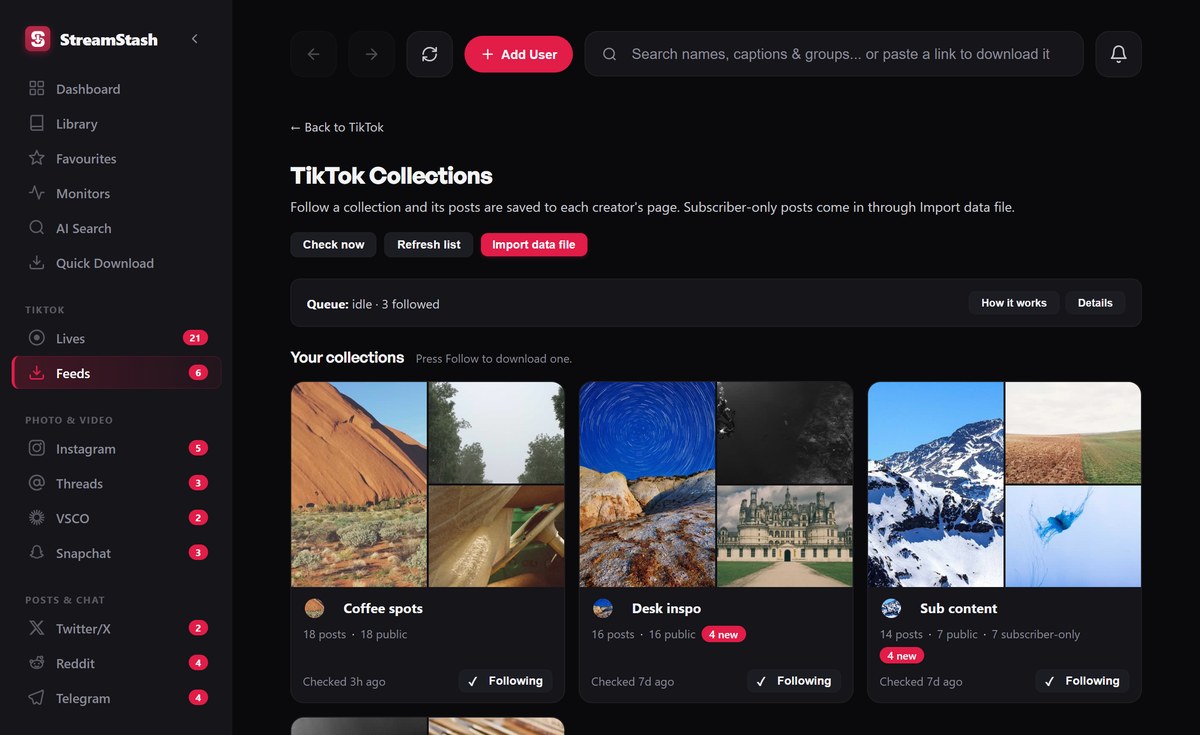
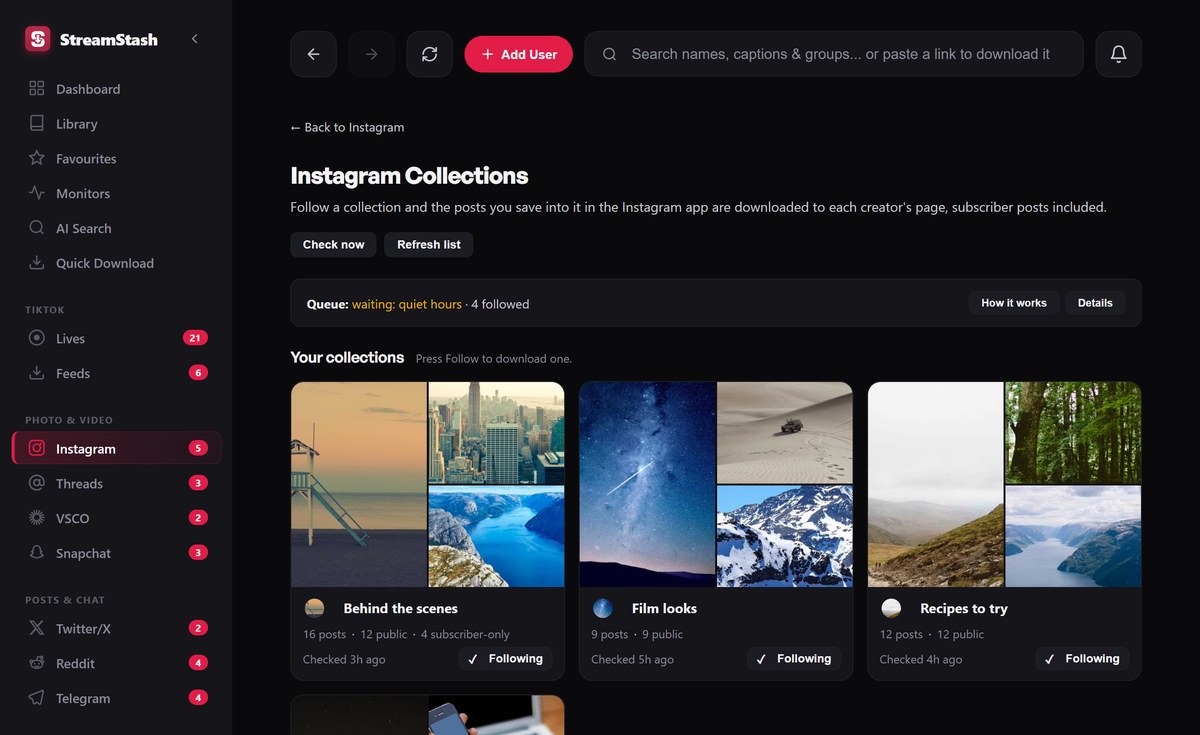
Real screens from our demo library. The creators are made up.
Save it in the app. Find it in your library.
You keep saving posts the way you already do. StreamStash watches the collections you choose and copies each new save to your drive while it still exists.
Save a post
Add it to a collection in TikTok or Instagram, or like and favourite it on TikTok. Nothing new to learn.
Press Follow once
Open the Collections page in StreamStash, signed in through Firefox, and follow the collections you want kept.
Checked every 6 hours
Followed collections are looked at again about every 6 hours. Big ones catch up over a few checks, with a banner counting what is left.
Filed by creator
Each post joins the page of the creator who made it, and every collection also gets a page of its own with a filter per creator.
TikTok and Instagram, compared.
Both work the same way from your side, but the two platforms differ in what they hand over. Here is exactly what to expect from each. More on each platform on the TikTok downloader and Instagram downloader pages.
A saved post is a bookmark, not a copy.
Collections hold exactly the posts people mean to come back to: recipes, outfits, tutorials, a creator's best work. They are also the first to disappear, because every one of them depends on someone else leaving it up. Paste-a-link sites and browser extensions grab a batch once and stop. A running backup keeps up as you save.
For the Instagram side in detail, read how to download your Instagram saved collections.
- The creator deletes it
Tidying a grid or pulling an old video takes it out of every collection it was in, with no notice.
- The account goes private or vanishes
A locked, banned or deleted account takes everything you saved from it along with it.
- Your copy stays put
Once StreamStash has a post, it is an ordinary file on your drive, whatever happens to the original.
TikTok is free. Instagram starts at Personal.
Every plan is a one-time payment, with no subscription and no account to create.
| Saved collections | Free£0 | Personal£20 once | Power£40 once |
|---|---|---|---|
| Follow TikTok collections | |||
| TikTok Likes and Favourites | Uses a feed slot | Uses a feed slot | |
| Instagram saved collections | - | ||
| Instagram subscriber posts | - | ||
| TikTok subscriber-only posts (data file) | - | - | |
| HD master files for Likes and Favourites | - | - |
Likes and Favourites each count as a monitored feed (Free has five, Personal 15, Power is unlimited). Followed collections never count. Compare every plan.
Saved collections, answered.
Subscriber posts are only ever saved when your own account can already watch them. Nothing is unlocked.
Yes. Sign in to TikTok in Firefox, then press Download on Likes or Favourites in the Likes & Favourites section of the TikTok page. StreamStash imports the list, newest first, as far back as you choose (the last 100, 200, 500 or 1,000, or everything), and keeps adding what you like or favourite afterwards.
Instagram has no bulk download for saved posts. Put the posts into one or more collections in the Instagram app, then press Follow on those collections on the Collections page in StreamStash. Everything in them is downloaded, a steady batch at a time, and new saves are picked up on later checks.
TikTok collections and Likes & Favourites work on every plan, Free included. Likes and Favourites each count as one of your monitored feeds (five on Free, 15 on Personal, unlimited on Power); followed collections do not. Instagram saved collections are part of the Personal (£20) and Power (£40) plans. Importing your TikTok data file to save subscriber-only posts is Power only. Both paid plans are one-time payments.
Yes. Followed collections on both platforms are checked about every 6 hours. On Instagram a check also runs straight away when you follow a collection or press Check now. Save a post on your phone in the morning and it is usually in your library by the afternoon.
No. StreamStash uses the TikTok and Instagram accounts you are already signed into in Firefox on the same computer, so it only saves what those accounts can see. Chrome and Edge keep their logins locked away from other apps, which is why it has to be Firefox.
On TikTok they are still saved, on a hidden page for that creator that shows up if you add them later. On Instagram they are counted and skipped, and the collection page names those creators; add them on the Instagram page and their posts come in on the next check.
TikTok's website leaves subscriber-only posts out of a collection, and the Collections page tells you how many are hidden. On Power you can bring them in by importing your TikTok data file, provided your account is subscribed to the creator. Only the list of saved posts in the file is read, and it only saves what your subscriptions already let you watch.
No. Only collections you made yourself are offered. Automatic lists such as All posts are not, so move the posts you want into a named collection first.
No. Taking a post out of a collection in the app keeps the file you already downloaded, and a post a creator deletes stays on your drive too. When you are done with a TikTok collection, Delete Collection & Files removes only what that collection alone brought in.
Your saves, on your drive.
Follow your collections once and every new save on TikTok and Instagram lands in your library, filed by creator, without you lifting a finger.
Also from the creators you follow: TikTok stories before they expire and automatic Live recording.